eobdtool

显示标签为“Ford VCM IDS”的博文。显示所有博文

2016年8月31日星期三

Free download Ford IDS V101.04 for Ford VCM II and VXDIAG VCX NANO

Newest released version Ford IDS V101.04 is now available! This IDS V101.04 is both compatible for Ford VCM II and VXDIAG VCX NANO for Ford/Mazda. Here is free download link for you, enjoy!
Ford IDS V101.04 Free download link:


Ford VCM IDS V101.04 Update Instructions:
Before start, please make sure to adjust your settings in VMware.
  1. Download the latest version WinRAR. It must be at least version 5.30 or higher. It’s free from WinRAR’s website
  2. Extract the folder from the file to wherever you’d like.
  3. Make sure to have VMware Workstation 12 installed. (We didn’t test this on any other version)
  4. Open VMware and press Open Virtual Machine. Go to the folder where you extracted the RAR file and select the .VMX file.
  5. Configure the virtual hosting settings, if you’d like (RAM, Processors, etc)
  6. Press “Power on this virtual machine”
  7. When it asks about the network card, press “I Moved It”
  8. If you have an original / OEM Ford VCM 2, just plug it in to the computer. OEM drivers should automatically install. If it is a clone VCMII, install VX Manager on the desktop. After the install, choose VCMII Plus. Then, connect your VCMII and let the drivers install.
Note: Some forum guys said Ford IDS V101.04 is also work on VXDIAG VCX NANO, we haven’t tested it. You can have a try on your own risk.

2016年1月21日星期四

VCM2 IDS 3 day License and how to do?

As for IDS software, the license is for 3 days and users are told to install software freezing to enable you to use it for longer, what it means and how to do?
General explanation on 3 days license and how to do:
The story goes that with every install of ids you have so many days trial period to test it.
The hackers would make a patch to bypass the date registry so it never got requested.
Latest patch is v86.xx after that there are no patches, so v9.xx installs but gives 3 days evaluation (used to be 5 days on v7/v8.xx.
So now we have to somehow reverse the date 3 days.
Standard install will know that you've rolled back the date so won't work unless you can completely remove the registry entries or reinstall windows (but who wants to do that eh :? ) so now they've invented a freeze program that you install first which basically allows you to roll back the date every 2/3 days and run ids again. The other option is to install vmware which can freeze and restore ids when you use it (like a restore point but no registry entries for rollback)
But you don't need vmware if you install the freeze program correctly.
Step-by-step instruction on how to install V81 and freeze program correctly
For the beginner, I list the step-by-step instruction on how to install V81 and freeze program correctly
Section 1: How to install Ford VCM 2 IDS V91 – up to V96
Insert V91 Ford VCM II CD into your computer.
Open the file and copy and paste “DFSTD” and “DFSTD KEY” to the desktop.
Double click “ids-91.01_full”.
Select language and click “Next”.
Click “Yes”.
Click “Next”.
Select “I accept” and click “Next”.
Click Next to install the software on Disk C.
Click “Reboot”.
Select “Non-Dealer” as Dealer Type and “MADAGASCAR” as Country and then click “Tick” icon.
A window “IDS Software – Computer Date Synchronization” will pop up, click “Continue”.
Then you will get a window saying your computer will expire in 3 days. If there is no expire message, it indicates your installation failed and cannot be reinstalled. Therefore, please strictly follow this video.
Section 2: How to install IDS V81 calibration files
Take out V91 CD and insert V81 IDS CD.
Open the file and double click “VCMDVD”.
Click “Calibration” to install calibration file.
Click “Next”.
Click “Next”.
Click “Install”.
Click “Finish”
Click “Exit”.
Check if its device has established communication with the car by check “ETAS VCI USB RNDIS DEVICE” in device manager.
Check if there is VCM network in “Network Connections”.
If the VCM network is disconnected, open “Windows Firewall” and select “Off”.
If the network is still disconnected, select “Start” – “All programs” – “Bosch” – “VCI software” – “VCI Manager”.
Open “VCM Manager” and Click “Repair USB”.
Click “OK”.
The network is now connected.
Double click “IDS”.
Click “Tick” icon.
Then the upgrade will start automatically.
Click “Tick” icon at the bottom right when the upgrade is finished.
Go to “User Preferences”, click “Computer” icon and check hardware and software version under “VCM II”.
Select “Start new session” and click “All other” to establish communication to the car.
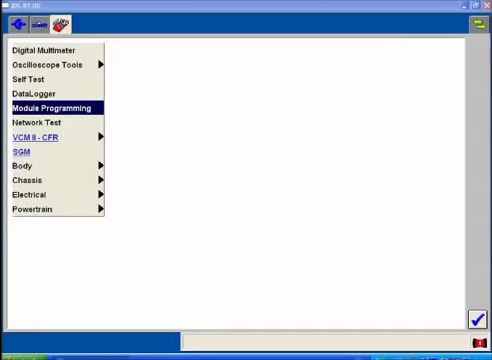
Select “Module Programming”.
Section 3: How to install Freeze Software
Very important note: the Freeze software should be installed within 3 days after the V91 IDS is installed. Otherwise, the Freeze software will not be installed anymore.
Open “DFStd”.
Click “Next”.
Select “I accept” and click “Next”.
Find License Key in “DFStd_KEY”.
Copy and paste the key into the blank and click “Next”.
Unselect Disk D and click “Next”.
After installing the frozen software, the V91 IDS software will not be deleted even if you reinstall the computer system. Therefore, if you want to install other version VCM2 IDS software later, please choose V86 rather than V91.
Click “Next”.
Click “Install”, your pc will then reboot automatically. The installation is finished.

2015年12月17日星期四

Tool advice to read transit ECU and ABS for Ford 1.8 tdci Focus?

I have an Fsuper obd2 scanner which works on my 1.8 tdci focus but doesn't have a menu for the transits with tdci engines.
My purpose is to find a software available to read transit ECU and ABS. My transit age is 58 plate 2.4L Duratorq-TDCi (100PS) 350 van. We have Transits 04-60 plate and an 09 Ford Ranger so it would be handy to cover them all.
Tool that highly recommend:
Obd compliance is for engine, abs etc are optional so you'll need a really good diagnostic kit to do it, VCM2 IDS for €115 is what i recommend all day long.

Certainly IDS would cover your Transits 04-60 plate and an 09 Ford Ranger.
Where to get VCM2 IDS?
I got mine from obdtool.co.uk, PayPal, a few members in the forum have said that1 of the disks was faulty, mine were fine too, however, you are free to shop where you like, at least message the seller to confirm things etc.
The clone Ford VCM 2 I tested for functionality. I purchased from here
I can verify it does seem to run faultless & already wifi enabled.
It's done Pcm update, pump/inj learns, config. Runs fine on w7 notebook and iPhone.

Which Windows Operation System(OS) is required?
Plus it's running on windows7 with 1 gb of ram on what could be called a netbook as not having a cd drive, which may boggle a few members including me from what we've learned.
I have a Sony VAIO fz38m dual core with t8100 and 4gb ram, with built in blue Ray etc, which is a good spec, had w7 and got ids working but then it wouldn't, yours loaded first time and at 1gb i think it should be hanging or locking up lol, another member had the same problem and got himself a higher spec laptop which sorted it, there is a chance that each manufacturer of laptop may be able to cope better at whatever the processes are involved in ids, but i don't know tbh, i know Ford use the tough book for ids so.........
If it works, it works, definately get a 2gb stick in that laptop you have, plus keep it as a backup one when you get your new 1, i have on occasion gone to my laptop and it has said darabase missing, which may have been down to the sequence of how i plug the vcm in but i have a way that i do it now and never have a problem
Answer to one FAQ:
Question: Finally got mine and the main installation and patch were fine, it recognises my fiesta, yet to try it at work on a transit.
The second disc is corrupt, I can read the file directory but no files, most importantly the calibration file V2012.9-81 will not load. Any workarounds?
Answer: Need to get hold of a calibrations disk, don't do any module programming until you do.
Recommend you watch video at: https://www.youtube.com/watch?v=tZkV2R8jjAQ

2015年12月16日星期三

Ford transit 2007 110 minibus code reader advice

I have been having problems with out 2007 110 minibus, so want to get a code reader but am a little bit confused which one is actually suitable for this one.
Optional advice and recommendations
1) Option one: Vcm2, elm 327 Bluetooth adapter or Autel AL519
Vcm2 is well worth the money.
VCM2 Ids is the best tho as it reads stored codes, all modules like engine, abs, srs etc etc and generally gives Ford specific codes which cheap ones will mainly give generic codes.


Most cheap code readers work on the mk7 for diagnosing codes related to engine management, i have a cheap elm 327 Bluetooth adapter that connects to my android phone using torque app.
I bought elm327 Bluetooth from:
I also have a 50 pound reader with lcd display Autel AL519 which is good for clearing engine fault codes.
2) Option two: VCM 2, Elm 327 or F Super
Unfortunately, it depends on what you call a proper answer. Also the goal posts have moved in the last year with the arrival of the ids clones for a cost not much more than a full tank of fuel.
For engine codes up to P1000 then an Elm 327 or F Super will read OK, and any other device that successfully communicates with the power train controller will. This is because those codes are fixed by international standards. Those same standards allow codes from P1001 to be manufacturer or model specific. I know the F-Super mk2 worked on my 2000 mk6 rwd TDDi but others appeared to have problems.
The best solution is the ids/vcm or ids/vcmii combination because it has the model specific stuff.
VCM2 can be found on ebay and on some of the obd equipment supplier websites eg. www.eobdtool.co.uk.

2015年12月3日星期四

How to use Ford IDS remove a speed limiter on Ford Transit Connect?

Post is on How to use Ford IDS to remove a speed limiter on a Ford Transit Connect. Go on reading for instructions.
Where can I get Ford VCM 2
Option 2: Top quality VCM 2 V97 with wireless adapter
Personally, I got the cheaper Ford VCM 2 V96 for £81 + shipping, Item No. SP177 from

Step-by-step instruction goes as follows:
Once Ford VCM 2 & IDS have communicated with your Transit Connect
  1. Open IDS, select toolbox and then "Module Programming"- click on tick mark
  1. Select "Programmable Parameters", then "Speed Items" - click on tick mark.

  1. Select "Vehicle Speed Limit -(PCM), then "Disable Speed Limiter" - click on tick mark.

  1. It will then ask if equiped with PATS - Select yes for PATS.
IDS will then erase PCM (ECU)
IDS will download Data to PCM (ECU)

  1. Click on tick mark to continue
-IDS will ask you to turn ignition off and on several times.
  1. Run PATS service function - click on tick mark to continue
-IDS will ask you to turn ignition off and on several times.
  1. Operation complete - click on tick mark to continue
After DTC's have been cleared process is completed

2015年11月26日星期四

VCM II Do Ford Module Programming on Focus 2008.25MY

This is the instruction on how to do Ford Module Programming on Focus 2008.25MY, by Ford VCM 2 diagnostic tool.
Compatible device:
Video instruction:
Step-by-step instruction:
Open Ford Module Programming on Desktop.


Read the user information and click Continue.
Select New Session.
Establish an internet connection and then click Confirm.
Click the tick button.

Establishing communication to PCM.
Select vehicle information “2008.25 MY”. Click the tick button.
Prompt: was the vehicle built before 2008 March? Select No and click the tick button.
Waiting...
Click YES if the vehicle specification is correct.

RO Odometer interface: click the tick button.
Then you will read as follows:

Select Module Programming. Then click the tick button.

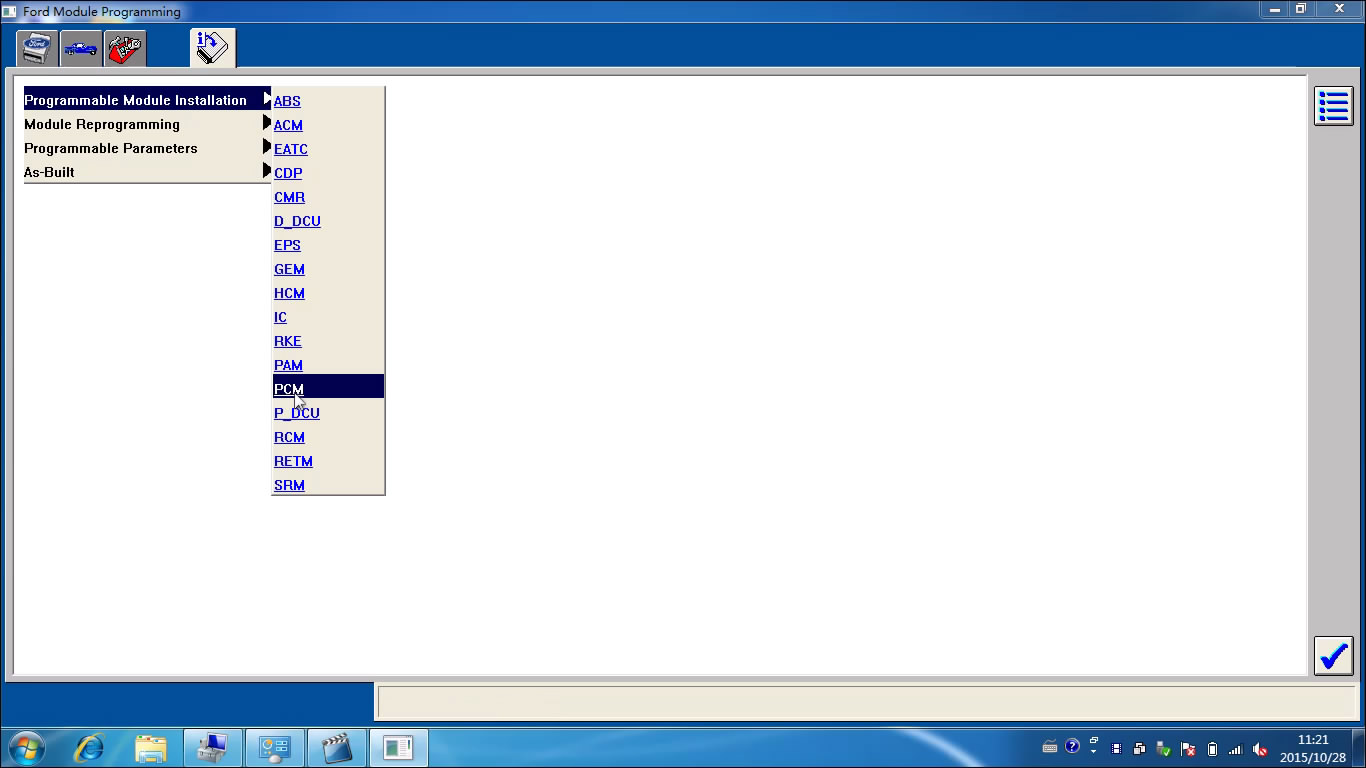
Select Programmable Module Installation>>PCM. Then click the tick button.

Click the tick button.

Establish an internet connection and then click Confirm.
Waiting...
Operator action: Set ignition switch to OFF (Position 0) and then click the tick button.
Click the tick button.

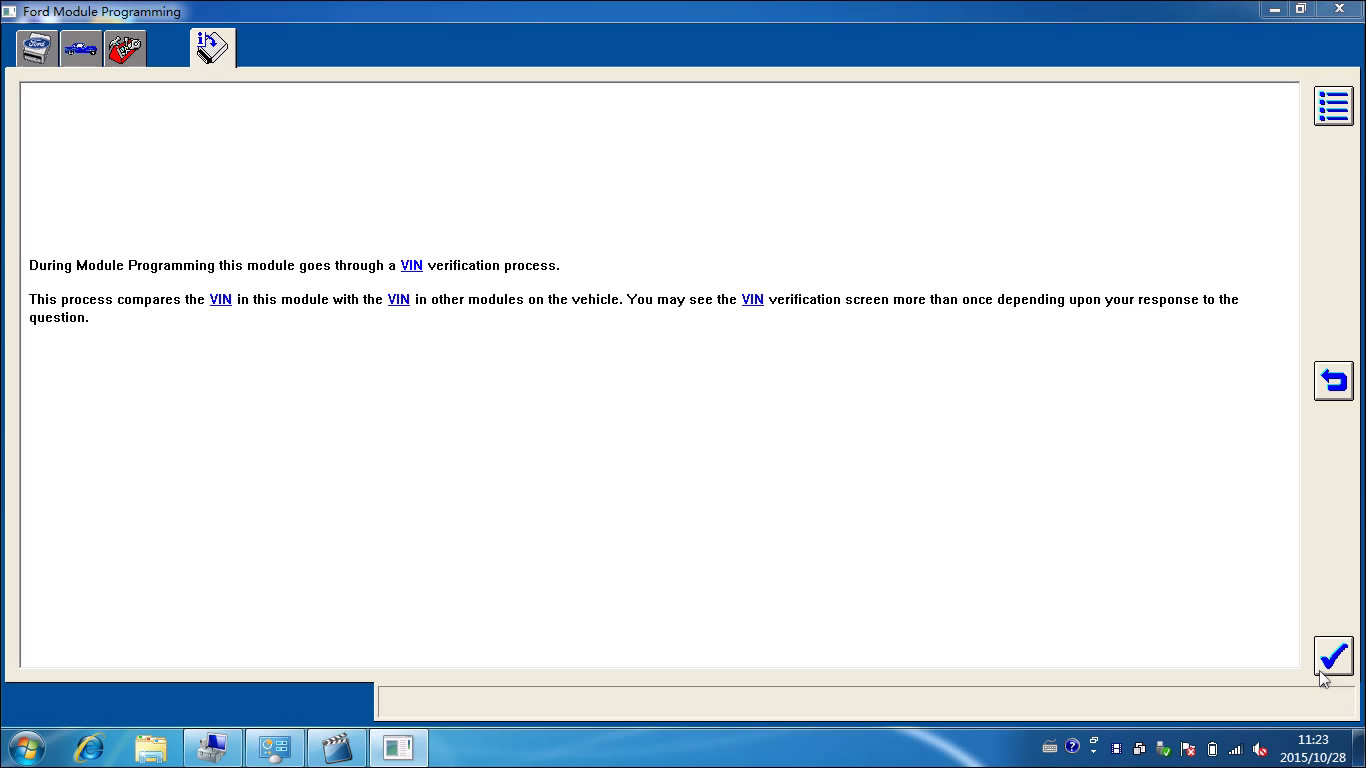
Click YES if the VIN displayed is correct.
Install a new module in vehicle and then click Confirm.
Note: Do not start a reprogramming session with a low battery on the vehicle and/or programming tool.
The fuel pump and the engine cooling fans may run the following procedure.
If you are programming a 6.0L diesel, the PICM relay must be removed before programming.

Operator action: Set ignition switch to ON and then click the tick button.
Erase procedure in progress, please wait...
PCM reprogramming, please wait...

Operator action: Set ignition switch to OFF (Position 0) and then click the tick button.
Operation in progress...
Operator action: Set ignition switch to ON and then click the tick button.
Operator action: Set ignition switch to OFF (Position 0) and then click the tick button.
Calibration has been loaded and checked and then click the tick button.
Prompt: If you programmed a 6.0L diesel, please reinstall the FICM relay. Click the tick button.
Read and click the tick button.

Operator action: Start engine, NOTE: Do not depress the throttle pedal. Then click the tick button.
Operator action: Set ignition switch to OFF (Position 0) and then click the tick button.
Operator action: Set ignition switch to ON and then click the tick button.
Clearing DTCs...

Operator action: Set ignition switch to OFF (Position 0) and then click the tick button.
Click the tick button.

Done!!

2015年9月29日星期二

Ford IDS V96 V97 Installation Order

These days, we obdtool customer service received many complaints about installation problem of Ford IDS. Here is the installation notes for sharing.

Device to use:

Operating system:
Windows XP or few WIN7.

Installation order:
1. IDS V81


2. IDS V91


(note: “a non-renewable Evaluation License has been installed on your computer which will expire 3 days”; if you do not get the message, it means the installation fails, then do not continue.)


3. IDS V96


4. IDS V97
   Open the software “Thunder”, and put the link below to the URL line.
   The link to free download Ford IDS v97.01:
http://www.fordservicecontent.com/Ford_Content/IDS/IDS-97.01_Full.exe


Detailed information about:


2015年9月23日星期三

Free download Ford VCM2 IDS V97 (V97.1) software

Ford VCMII IDS software has been updated to V97.01 (23/09/2015). Free IDS V97 and update instruction is provided below. 


NOTE: IDS V97 is compatible with Ford VCM 2 scanner SP177-1, SP177-C, SP177-C1 and SP177-C2. Do not work on other VCM2.

Software version: IDS V97.1
Operating system: Windows XP/ Windows 7 on VMware (recommended)

Free download Ford IDS V97.1 software
You can download form the link directly or download from Thunder (enter URL to download directly), because the software is huge.


How to update VCM2 IDS to V97?


1.       Have old V81, V91 IDS installed

1) First install C81 Calibration files and then V86 IDS
2) Then install V91 IDS, if the software displays 3 day trial prompt, then continue to install IDS V96, otherwise quit software installation and change another laptop to re-install software
3) After well install V96 IDS, install IDS V97 software
4) Update VCM2 firmware (following instructions below)


2. Have IDS V96 installed

If you already have VCM2 IDS V96 installed, then directly install V97 IDS and update VCM2 firmware.


How to update Ford VCM 2 scanner firmware?

1) Press the power button on VCM2 scan tool main unit

2) Long-press on the power button, connect VCM2 with power supply, wait for all 4 indicators turn on, then release the button. Then connect VCM2 with computer via USB cable
3) Run IDS software, software will prompt to update firmware. Wait the update procedure is done.


4. Restart computer when firmware update is completed. Connect VCM2 kit with vehicle to start diagnosing or programming functions.


2015年9月2日星期三

How To Factory Reset Your VCM II when Inoperable

Here is an easy way--- factory reset, for you to fix your Ford VCM II when it becomes inoperable. For example, VCM II will not boot-up properly, VCM II LED's not functioning properly, etc.

1. Shut down the IDS application if it is running.
2. Disconnect the VCM II DLC cable from the vehicle.
3. Disconnect the VCM II USB cable from the VCM II and PC.
4. Remove the rubber boot on the VCM II that is opposite the DLC connector to expose the Recovery Mode Switch.


5. Start the IDS application.
6. Press and hold the plastic tab. Do not release the tab until Step 9.
7. Connect the VCM II to the PC using the USB cable.
8. Wait for the VCM II's Power LED to remain on and for the unit to beep.
9. Release the plastic tab - the VCM II will be in Recovery Mode.
10. The IDS pop-up window below will appear notifying the user that a new version of VCM II software is available. Select the Tick button to update the VCM II software.
11. Follow the IDS on-screen instructions to complete the software installation.


Hope it help you guy out.

VCMI2 IDS from obdtool.co.uk feedback

Got my vcm2 scanner from obdtool.co.uk last year and help with software from a well known forum member, no name (fordtransit.org)

It arrived on time (4 days exactly) and well enough packed in a plastic box.
Came with v81 calibration file, V86 IDS and V91 IDS disks,


Software installation is a little bit tricky. I would say being computer literate would be an advantage, in the installing of the software, if you have anyone to help they could do it fairly swift. And easier if follow the video guide they provided on webpage (Win XP would be better).
Here is the v86 VCM2 IDS
and here’s another V91Ford IDS software video guide

I am stick to V86, it is old enough for my Transit 2.2 2008. Operation of the thing itself via pc is straightforward enough, on screen prompts and so on. Vcm kit is working and has communicated with the van.

The Ford VCMII IDS OEM diagnostic tool helped force DPF Regeneration, successfully bleed brake, reset steering angle sensors, reset airbag and remove speed limiter (Connects use a calibration file when adapting\removing the speed limiter, you will have to re- do the cluster to ecu once done, you will need both keys to reprogram as well, when you choose speed limiter off it will come up with a message about a configuration file needed.)

€119 delivered for the sp177 not bad at all think thats what ill be getting. Still works though and I am happy with it and it has more than paid for itself.

2015年8月27日星期四

Ford VCM 2 Clone Works with Mazda IDS V96

Many people talk about Ford VCM 2 Clone with Mazda IDS V96 but cannot find a successful solution. Here, we obdtool technicians offer you the most detailed instruction to help those have trouble in China clone Ford VCM2 and Mazda IDS V96.

Set a new folder named “VCM 2” on Desktop.
Open “Computer/DVD Drive (E:) VCM2 MAZDA V96” to copy the three .rar files to the new folder “VCM 2” on Desktop.
Extract all the three files in the folder “VCM 2”.

1. Install IDS V96
Open “IDS V96”.
Choose the setup language to continue.
Preparing setup...
Select “Yes” to proceed.
Click “Next” to begin installation of IDS V96.
Click “Next” with the selection of “I accept... license agreement”.
Click “Next”.
Click “Install” to begin installation.
Installing... ( an IDS icon on Desktop)
Configuring...
Updating...
Configuring...
Click “Reboot” to restart your computer when IDS is installed.

2. Uninstall IDS
Open Start menu to select “Control Panel”
Select “Programs/ Programs and Features”. Select “Mazda IDS” in “Organize” and click “Uninstall”.

Preparing setup...
Click “Continue” with the selection of “Uninstall IDS only”.
Uninstalling...
Click “Finish” to restart your computer now.

3. Install Mazda IDS
Open “VCM 2/IDS V96/setup”.

Choose the setup language to continue.
Preparing setup...
Select “Yes” to proceed.
Click “Next” to begin installation of Mazda IDS.
Click “Next” with the selection of “I accept... license agreement”.
Click “Next”.
Click “Install” to begin installation.
Installing... ( an Mazda IDS icon on Desktop)
Configuring...
Adobe SVG Viewer 3.0 setup...
Configuring...
Updating...
Configuring...
Click “Reboot” to restart your computer when Mazda IDS is installed.

4. Install Mazda C93.
Open “VCM 2/C_CD/setup”.

Calibration...
Click “Next” to begin installing Mazda C93.
Click “Next”.
Click “Install” to begin installation.
Installing... (about 30 minutes)
Click “Finish” to exit the wizard when Mazda C93 is installed.

Open “Computer/Local Disk (C:)/Program Files/Bosch/VIX-VCI/”. Two folders--- “VCI Software (Ford-VCM-II)” and “VCI Software (Mazda-VCM-II)”. Copy all the files from “VCI Software (Ford-VCM-II)” to “VCI Software (Mazda-VCM-II)”.
Click “Yes” with selection of “Do this for all current items”.
Copy and replace for all conflicts.
Click “Continue”.

5. Run Mazda IDS.
Connect your VCM II and vehicle.
Open “Mazda IDS” on Desktop.
Select “dealer type: Non-Dealer” and “country: IRELAND”. Then click the tick button.

Configuring PC and VCM II use...
Select “Start New Session/All other”.

Establishing communication to PCM...
Select “Yes” for the vehicle specification.
Select “No” and click the tick button.

Click the tick button.

Turn to this interface to select “DataLogger” and click the tick button.

Select “Modules/PCM” and click the tick button.

Establishing communication with the ECU...
Select “Test (MODE)” and click the tick button.

Then you will get the engine coolant temperature.

Turn to this interface to see the vehicle specification and then select “Delete (delete session)” .


Exit the software Mazda IDS V96.

END.