eobdtool

显示标签为“Ford VCM 2”的博文。显示所有博文

2017年5月4日星期四

4 Typical VCM2 clone SP177C SP177C1

There are 4 famous types of VCM2 clone Ford diagnostic interface, including the most populous VCM2 SP177C, SP177C1 (talked most in forums). Collect and share them here!

Vcm2 of high quality - its the BEST
The hottest VCM2 clone model: SP177C&SP177C1, seems the same as this

Vcm2 of good quality
Vcm2 of middle quality
Vcm2 of very bad quality
In summary, good vcm2 clones usually cost $150 around. Never believe in the cheapest but best-quality! You will get what you pay for.


2017年4月2日星期日

Ford VCM2 IDS Special Function, how to activate

With Ford VCM2clone with IDS, how to enable or activate Special Function in the menu Module Programming/Programmable Parameters/Car Configuration Parameter(s)? Here is the how-to guide from a CT member. It’s a customer experience; try at your own risk.

Ok just had a play and i managed to get to enter the code (here: 60274)

I found where IDS stores these codes:
C:\Program Files\Ford Motor Company\IDS\Runtime\Registry.xml
Under <key name="UPDATEFUNCTIONS">
Going to try them out.

Enter the code
00008 - IDENT_APPLY_PATCHES_VIA_FLOPPY
00009 - IDENT_UPDATE_PTU_FROM_FLOPPY
32287 - IDENT_LAUNCH_APP_MCP_REST
60503 - IDENT_LAUNCH_REGRESSION_RECORDER
27001 - IDENT_LAUNCH_FT_EOL_CP_MZ_01
32247 - IDENT_LAUNCH_SERVICE_ROUT
24040 - IDENT_ENABLE_VALIDATION_MODE
24041 - IDENT_DISABLE_VALIDATION_MODE
23761 - IDENT_LAUNCH_APP_FT_DATA_REC
81105 - IDENT_LAUNCH_APP_TSBSSMLIST
53061 - IDENT_IGNORE_MCP_INHALE
26503 - IDENT_LAUNCH_APP_VVAG
81104 - IDENT_LAUNCH_APP_FTW_SHIP_MODE_01
29124 - IDENT_TOGGLE_FORD_EXTRANET_INTRANET_URLS
60274 - IDENT_LAUNCH_CCC_ENGINEERING_APP
32227 - IDENT_LAUNCH_PROPSHAFT_BAL_APP
48712 - IDENT_LAUNCH_GENERIC_RCM_CONFIG_APP
28487 - IDENT_LAUNCH_FT_ICCMSP_MZ_01_APP
28097 - IDENT_TOGGLE_BATTERY_MONITORING
70263 - IDENT_LAUNCH_GENERIC_DIAG
71863 - IDENT_MCP1
63296 - IDENT_LAUNCH_FTW_RKE_MODE_01_APP
08080 - IDENT_LAUNCH_DETAILED_NETWORK_DIAG
32267 - IDENT_LAUNCH_APP_ENG_SUPPORT_TOOL
 
Enter the code 60274

It changes the ccc option in module programming to a different list with more options and also appeared to give me icons to read and write dumps,

But I ran out of time to play more and see what options did, I did try to disable my seat belt off warning buzzer but it failed to work, Other peoples input would be nice once you test it...

See my photos, get the first page up as shown then click update/ special functions on your right hand side

As for getting nothing to appear in special function through VCM2 IDS, i had two option in there, read config file and modify, Also for me the tool box module programming, 3rd option down had changed to allow what i would normally alter within ccc as well as a as built option which i do not normally see on this year of car, It had speed items for one listed, were as this is found on later fords than mine in the pcm on first page. 

2016年8月31日星期三

Free download Ford IDS V101.04 for Ford VCM II and VXDIAG VCX NANO

Newest released version Ford IDS V101.04 is now available! This IDS V101.04 is both compatible for Ford VCM II and VXDIAG VCX NANO for Ford/Mazda. Here is free download link for you, enjoy!
Ford IDS V101.04 Free download link:


Ford VCM IDS V101.04 Update Instructions:
Before start, please make sure to adjust your settings in VMware.
  1. Download the latest version WinRAR. It must be at least version 5.30 or higher. It’s free from WinRAR’s website
  2. Extract the folder from the file to wherever you’d like.
  3. Make sure to have VMware Workstation 12 installed. (We didn’t test this on any other version)
  4. Open VMware and press Open Virtual Machine. Go to the folder where you extracted the RAR file and select the .VMX file.
  5. Configure the virtual hosting settings, if you’d like (RAM, Processors, etc)
  6. Press “Power on this virtual machine”
  7. When it asks about the network card, press “I Moved It”
  8. If you have an original / OEM Ford VCM 2, just plug it in to the computer. OEM drivers should automatically install. If it is a clone VCMII, install VX Manager on the desktop. After the install, choose VCMII Plus. Then, connect your VCMII and let the drivers install.
Note: Some forum guys said Ford IDS V101.04 is also work on VXDIAG VCX NANO, we haven’t tested it. You can have a try on your own risk.

2016年6月22日星期三

Got message Ford VCM 2 V98.01 Software Update, how to do?

As for Ford VCM 2 software V97 update to V98.01, users may encounter problem as follows: “A newer version of the VCM 2 software us available. Update the VCM 2 before continuing. Select tick to update VCM 2 software/ Select cross to cancel.”


Q: Why this prompt message showed?
A: Because the hardware version and the software version are not compatible.
Solution: Just tick to keep the upgrade go on, otherwise the update will be interrupted.


If this solution is not working, try second one: Unscrew the back of  Ford VCM 2 main unit, press the button to update (read following picture). After finish, open the software again, and you will see the message again, and click "tick".
Check the following video link for detail information or ask sales for help at http://www.eobdtool.co.uk


If it’s still not working, the last available solution is that: Find the QC mark.
1.     Mark end with 008, then disconnect the main unit with both car and power source, connect it with laptop by USB, press the button to force the upgrade.
2.     Mark end with 002, the main unit must connect with car or power source, next press the button to force the upgrade.


2016年5月12日星期四

How to install VCM 2 v100 step by step

Ford IDS V100.01 had been developed and released for days. Have you managed to install and experience it?? Most detailed installation guide of FORD IDS 100 for VCM 2 is offered here. Hope it helps.

Free download Ford IDS 100.01:
http://www.chinaautodiag.com/html/ford-ids-v10001-free-download-25549.html

OS requirement:
Windows xp; Windows 7; VMware machine

Ford ids 100 language:
English, Deutsch, Espano, francais, italiano, nederlands, Portugues, Russian, Japanese, Chinese

Compatible tool:
Ford VCM 2 clone
(tested item: SP177  SP177-1  SP177-C SP177-G)
Item number
WIFI adapter
NO
NO, but can buy vcm ii WIFI adapter for WIFI function
Software
Ford IDS V98
Ford IDS V97
Ford IDS V97
Ford IDS V98
JLR SDD V142
Quality
Ordinary
B
A
Best
VMware
YES, Ford IDS can be installed on VMware machine, Windows 7 or XP
Update
Yes, VCM 2 software can be updated online or via CD from wobd2.com
Function
The same, diagnosis & programming

Ford IDS 100.01 installation instruction:

Step 1:Install VMware workstation
Open ford ids V100.01(E)/VMware-workstation-full-10.0.3-1895310.rar
Accept the terms in the license agreement,click next.
Choose the setup type that best suits your needs
Click next to install to this folder or click change to install to a different folder.
Check for product updates on the startup
Help improve VMware Workstation.
Select the shortcuts for you wish to place on your system.
Click continue to begin the process.
the wizard performs the requested operation
Enter License Key from the txt file “VMware-workstation-KEY-Notepad”
The setup wizard has successfully completed its operations related to VMware Workstation. Click Finish to exit the wizard

Step 2: Create a virtual machine
Copy “en-windows-xp.rar” in ford ids 100.01(E) to Local Disk (D)
Create a new folder named Ford IDS 100.01
Open VMware Workstation on desktop, and create a new virtual Machine.
Select the type of configuration you want.
Install from: installer disc image file(iso): D:\en_windows_xp.iso
Fill in install information from the txt file “VWware-workstation-KEY”
Name the virtual machine “FORD IDS 100.01” and located in D:\FORD IDS 100.01.
Specify disk capacity, and split virtual disk into multiple files.
Customize hardware and click finish to create the virtual machine and start installing windows xp professional and then VMware tools.

Step 3: Install windows xp professional and VMware tools
Please wait while setup examines your disk.
Setup is copying files...
Personalize your software and install devices
Perform configuration, copy files, complete installation and save settings.
Setting up personalized settings for software
Please wait while the setup wizard installs VMware tools
Reset date and time.

Step 4:View network connection
Disable local area connection connected, firewalled VMware accelerated AMD PCNet Adapter.
Turn off computer.
Remove “FORD IDS 100.01” from the library.
Copy the data from “VMware-workstation-key-notepad”.
Choose Notepad to open file: FORD IDS 100.01. Vmx,and paste the data.
Save the file.
Open VMware Workstation.
Power on this virtual machine.
Always do not show the hint again.

Step 5:Install calibration C81.
Choose destination location
Click install to begin the installation.
Calibration is configuring your new software installation.
The installshield wizard has successfully installed Calibration, click finish to exit the wizard.

Step 6: Install IDS-91.01_full
Open IDS-91.01_full
Choose setup language.
Preparing the setup.
Accept the terms of the license agreement.
Select the destination drive.
IDs is configuring your new software installation.
Update the database .
The installshield wizard has successfully installed IDS, and click reboot to restart your computer.
Open IDS on the desktop, and fill in the field below then click on the tick button to continue.
Synchronize the computer date

Step 7:Install IDS-100.01
Open IDS-100.01
Follow the steps to finish Ford IDS V100.01 installation

Step 8: Test the software
Open IDS-100.01
Start new session-all other.
Establishing communication to PCM
Select vehicle specification.
Open powertrain engine.
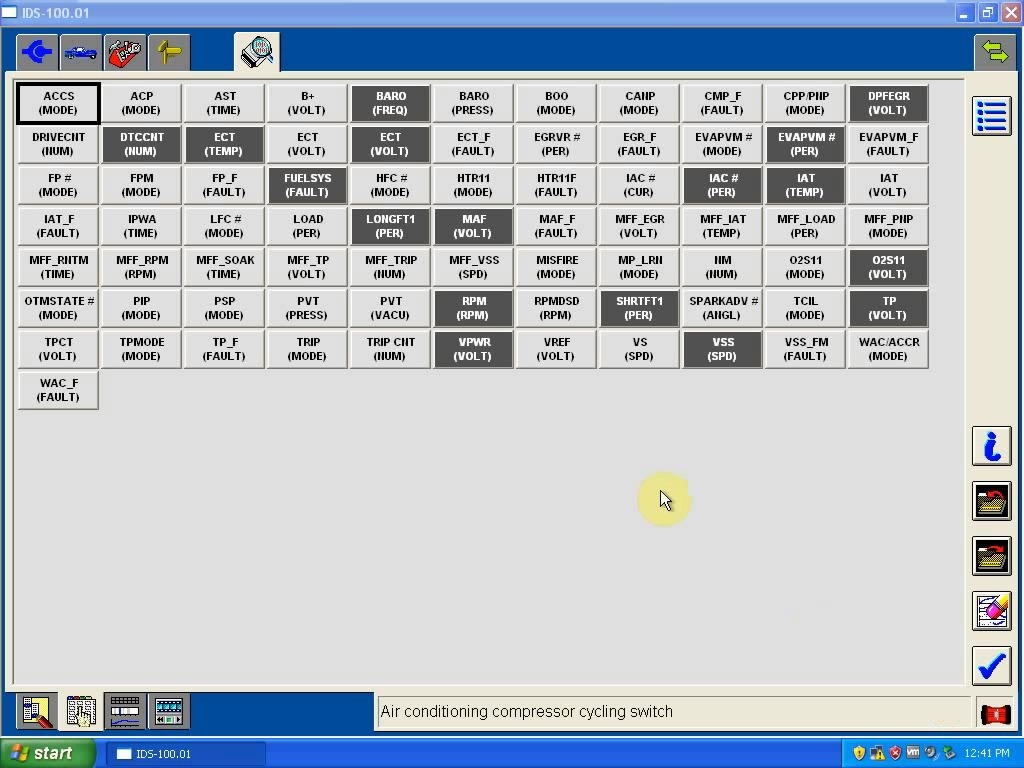
Equipped air conditioning
....
Ford ids function list:
* Automatic vehicle recognition
* Read & Clear Diagnostic Trouble Codes (DTCs)
* Live Data-stream with Recording & Playback Functions for Main ECUs
* Guided Fault Finding
* New Software Re-flash for Existing ECUs
* Programming & Installation of new ECUs
(PCM, ABS, Instrument Cluster, Air Bag, Fuel Pumps, etc.)
* Program New Keys
* Injector Coding
* Set, Adjust or Remove Speed Governors
* DPF Regeneration
* Brake Bleeding
* Steering Angle Resets
* All Other Dealer Functions


2016年3月3日星期四

Ford IDS V99.03 Russian English Free Download

The newest Ford IDS V99.03 has been released Russian and English version. Here’s the all new information and free download link of IDS 99.03 for FORD.


Free download:
Files included:
VMWARE FORD IDS V99.03 + CALIBRATIONS C81 RUS
Note:
* The license active for 3 days. Date frozen. Programming work.
* Software offered by a forum member, obdtool technicians haven’t tested yet, please try be responsible for your try.


Windows XP RUSSIAN.Interface IDS Language:
Russian and English

System requirements:
Windows 7, 10Gb HDD, 2Gb RAM.

Workable device can be tried to test with:

This is from obdtool: Best car diagnostic tools for sale website technical support