eobdtool

显示标签为“VXDIAG VCX NANO”的博文。显示所有博文

2017年5月25日星期四

VXDIAG Vcx Nano Ford Review

VXDIAG Vcx Nano review on Ford and Mazda… here you go.


VXDIAG VCX NANO is the same as VCM2 with a single board (which is very bad clone of VCM2).

By satria_wr
Vehicle: 2014 Ford Ecosport 1.5L Ti-VCT 110hp


My clone vcm2 was able to update the module online.
The single board is known to brick module since it doesn’t have complete chip on it.

By Automate
Vehicle: 2010 Ford Fusion Hybrid


The VCX Nano I took apart seems to be a custom design to emulate in hardware part of the hardware/software of the VCM II but the driver is most important too. I did not take pictures but gently peeling down the stickers reveals 4 screws. Once inside it is a very simple board with a ST micro cortex M4 STM32F4 Series based micro controller doing the work. The FT serial to usb chip-set and some caps and a space that was blank for I assume either the WIFI or Bluetooth module. I googled the device and did see a Russian site where a guy took apart a VW version and it had more chips and and older generation micro-controller.
Soldering looks like reasonable quality surface mount and no hand work or redo’s.

By stvkram
Vehicle: 2003 Mazda 6 3.0 V6 220hp


I test this tool, i buy the wifi version. Ford/GM/Toyota/VW/JagLR all works with wifi or usb connection 😀

By satria_wr
Vehicle: 2014 Ford Ecosport 1.5L Ti-VCT 110hp


I own VXDIAG VCX Nano WiFi. I use IDS v103.xx fine without issue. Latest update of VXDiag gives it a better stability when doing programming.

Tony Back
Vehicle: Ford Focus


Well, I just took the chance and bought one.
Couldn’t figure out how to get WiFi working on it, so I installed the driver
for USB and used USB instead.
Forscan detected it as J2534, and no errors was reported.
It didn’t find as many modules as my Vlink adapter does, but it had
the same missing fuel trims for bank 2 for my Scorpio 24V  😉

One hurdle with this device though – it is almost impossible to connect it
to the Scorpio, because the plug is a bit hidden, and this device is very big.
Anyone buying it should consider, if a small OBD2 extension cable is needed too.

By Yoda
Vehicle: Scorpio 2,9 24V 207HK 1997


I can add that regarding the VCX Nano for ford/mazda, I took mine apart and no bluetooth module is present. The bluetooth capabilities advertised on the main Allscanner site it not accurate. I can not speak for the WIFI version but I have the usb version and have used it with my 2003 Mazda 6 V6 and AFTER installing the “pass-thru” driver (J2534) it works perfectly and fast with FORSCAN.

By stvkram
Vehicle: 2003 Mazda 6 3.0 V6 220hp


Full chip high quality VCM II (SP177-C) is much better than VXDIAG NANO.
But be careful programming!

By ipy1975
Vehicle: 2015 Ford Mustang GT 5.0L V8

……

More VXDIAG Vcx Nano reviews will be updated here.

2017年5月14日星期日

Ford IDS 105.01 VMware ALL Info: Review+ Error Solution+ Q&A

Ford IDS 105.01 tested OK function and tools, Ford IDS 105.01 VM installation tips, Ford IDS error solution "Intel VT-x disabled", Ford IDS software Q&A.

Part 1: Which tools can I use with this Ford IDS 105.01 VMware? What functions are tested OK?
Ford IDS 105.01 VM compatible interfaces:
VCM IDS 3 (It can use latest Ford IDS 105.01-- confirmed by engineers)
VXDIAG VCX NANO for Ford/Mazda (Tested OK by users)
Ford VCM II Clone (Best quality, some yes, some no)
Ford IDS 105.01 Tested OK Reviews:
I did 6 module programming on a 2013 explorer yesterday and all OK!
Ford IDS worked great today. Programmed a few keys and flashed a PCM already. Working flawlessly. Hope it keeps it up.
Today I've programmed a Ford Focus blue key with this virtual machine and Ford VCM2. Tested ok!
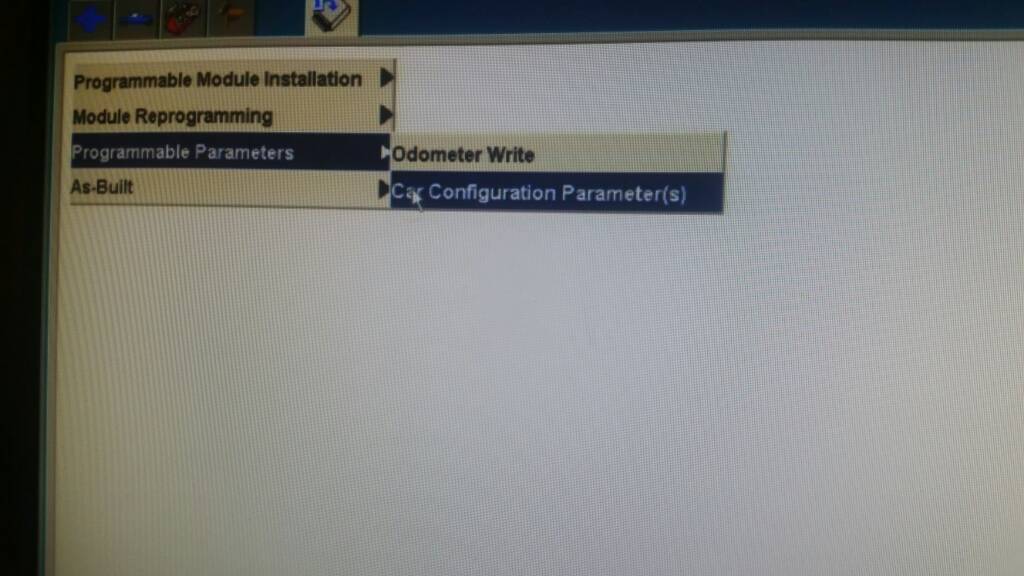
I've used it on 2015 F-150 to enable Car Configuration Parameters without any problem
Tested also with latest VCX manager and updated firmware on the NANO => work great with my VCX NANO Ford

I can now confirm both of these images are working with the Allscanner VCX Brand. Not sure if it makes any different but I used the latest VCX manager from the website.

I can confirm also. I made persistent HDD, then I installed drivers, restart. I checked license of VXDIAG... Then non persistent and now is ok.

Part 2: How to install Ford IDS 105.01 VM correctly?
Download Ford IDS 105.01 VM from here:
To be honest... Just turning non persistent off before the first start is all u need to do... And also click I moved it.
Leaving internet on doesn't matter.
In fact u need to keep it on if u wanna do programming from the server.

Ford IDS 105.01 VM installation tips for your reference:
Downloaded & extracted.
Opened in VMWARE 10. (In one of the first couple of lines in config file change the "12" to "10")
Clicked "I MOVED IT"
Turned of internet (don't know if it matters).
Turned off nonpersistent.
Started Up IDS 105.1 VMWARE
Plugged in OEM VCM and installed drivers.
Made cosmetic changes, performance changes to WIN7.
Opened IDS and made settings changes
Ran Shut down command in Guest System.
Turned nonpersistent back on.

Part 3: How to solve Ford IDS software error "Intel VT-x is disabled", "64 bit operation is not possible"?
Got the problem when run Ford IDS 105.01 in VMware machine:
This virtual machine is configured for 64-bit guest operating systems. However, 64-bit operation is not possible.
This host supports Intel VT-x, but Intel VT-x is disabled.
Intel VT-x might be disabled if it has been disabled in the BIOS/firmware settings or the host has not been power-cycled since changing this setting.
(1) Verify that the BIOS/firmware settings enable Intel VT-x and disable 'trusted execution.'
(2) Power-cycle the host if either of these BIOS/firmware settings have been changed.
(3) Power-cycle the host if you have not done so since installing VMware Workstation.
(4) Update the host's BIOS/firmware to the latest version.
all other images of IDS working without problem
need updating BIOS
Solution:
The error means you CPU isn't configured or capable of 64bit virtualization. Check your bios setting!
Change computer BIOS about virtualization that was disabled, change to enabled. Now IDS is working ok!

Part 4: IDS Ford software V105.01 Q&A
Q: What windows it works? And do I need a special winrar version to open the file ?
A: Windows 7/8/10 64bit all OK. Just use latest winrar version available from rarlab website.

Q: Help please! I have a VM ware IDS 105, but is asking for license?
A: Shouldn't ask if you click " I moved " it at first start!
Most of people license error come from clicking " I copied it" when u first start the VM.
You should click "I moved it".
Delete the VM.. unzip/ unrar again.
Start over.
Click "I moved it" then no issue anymore.

Q: Is there a way to accelerate this VMware? May I active some options for that?
A: This VM is using 1.5Gb so you will need at least 4Gb on your machine. CPU preferably an i5 processor. Allow more RAM, more CPU. but it won't ever be like a native machine.
Or try running defrag in VMware> HDD utilities
Hope it helps!
Quick link to ALL Ford IDS 105 compatible tools:

2017年4月16日星期日

Free download Ford IDS 105.01 for VCM II and VXDIAG VCX NANO

Here you can free download Ford IDS V105.01 VMWare with VCM II Manager for Ford VCM II clone and VXDIAG VCX NANO for Ford/Mazda! Newly released on 04.12.2017! Mega links as below:

Free Download Ford IDS V105.01 with VCM II Manager 2.3.85.7:
Part 1
Part 2
Password: nK6gE84
Thanks SCOTT’s sharing and try on your own risk!

Ford IDS V105.01 Compatible Interfaces:
Ford IDS V105.01 Update Information:
Support WINDOWS 7, WINDOWS 8, WINDOWS 10
This version has the ability to download the very latest calibration software files from Ford’s server if you have an internet connection available at the time of connecting to vehicles
Reading and decoding fault codes
Deleting fault codes
Displays system current parameters in digital form
Combined displaying of data
Logs keeping - writing and keeping of digital parameters in memory
Special function: changing of permissible settings of blocks, programming etc.

Ford IDS V105.01 Q&A:
Q: Is this Ford IDS 105.01 work with VCM II Clone?
A: Some yes! It works with VCM II clone that can use VCI MANAGER 2.3.85.7 and above.

Q: Thanks for sharing but after I download, there is no active license?
A: When you open VM at first time, choose “I move it” and all will be OK!

Q: Is the internet not supposed to work?
When I start the VMWare, it said that some settings were changed. I restarted and the license was lost. So I reinstalled it again, still no internet but the license is working now?
A: Go to “Devices”, choose “Network Adapter NAT” and check the box “Connect at power on”. Look at below picture:

2016年8月31日星期三

Free download Ford IDS V101.04 for Ford VCM II and VXDIAG VCX NANO

Newest released version Ford IDS V101.04 is now available! This IDS V101.04 is both compatible for Ford VCM II and VXDIAG VCX NANO for Ford/Mazda. Here is free download link for you, enjoy!
Ford IDS V101.04 Free download link:


Ford VCM IDS V101.04 Update Instructions:
Before start, please make sure to adjust your settings in VMware.
  1. Download the latest version WinRAR. It must be at least version 5.30 or higher. It’s free from WinRAR’s website
  2. Extract the folder from the file to wherever you’d like.
  3. Make sure to have VMware Workstation 12 installed. (We didn’t test this on any other version)
  4. Open VMware and press Open Virtual Machine. Go to the folder where you extracted the RAR file and select the .VMX file.
  5. Configure the virtual hosting settings, if you’d like (RAM, Processors, etc)
  6. Press “Power on this virtual machine”
  7. When it asks about the network card, press “I Moved It”
  8. If you have an original / OEM Ford VCM 2, just plug it in to the computer. OEM drivers should automatically install. If it is a clone VCMII, install VX Manager on the desktop. After the install, choose VCMII Plus. Then, connect your VCMII and let the drivers install.
Note: Some forum guys said Ford IDS V101.04 is also work on VXDIAG VCX NANO, we haven’t tested it. You can have a try on your own risk.

2016年1月22日星期五

How to install MAZDA IDS V98 on Win7/ XP

This is the instruction on installation of MAZDA IDS V98 for VXDIAG VCX NANO MAZDA.

Free download

Compatible device:
VXDIAG VCX NANO for Mazda (both wifi or non-wifi version are ok)


OS requirement:
WINDOWS XP/ WIN 7

How to install Mazda IDS 98
Video guide:

Step-by-step instruction:
Step 1 install Mazda IDS
Open Mazda IDS 98 disk.
Open .exe file- Mazda_IDS_98.00, to begin installation.
Select language. Here: English. Then click Next.

Preparing IDS setup...
Click Yes to proceed.

Click Next to install Mazda ids.

Accept the agreement to go on.
Click Next.
Click Install.
Installing IDS.... (10 minutes needed)
Click Reboot to restart your computer.

Step 2 install Mazda C93
Back to Mazda IDS 98 disk.
Open the folder C_CD>>setup.exe
Click Next to install C93.

Click Next.
Click Install.
Installing Mazda C93.... (10 minutes needed)
Click Finish when successfully install Mazda C93.

Step 3 install VX Manager
Back to Mazda IDS 98 disk.
Open VX Manager 1.0.6.1218.
Click Next to install VX Manager.

Accept the agreement and click Next.
Click Next.
Click Next.
Select Ford, and click Next.

Software automatically run...
Click Close.

Click Finish.
Check: Open VX Manager on Desktop, and then close it.

Step 4 Mazda IDS 98 test on Mazda 6
Open Mazda IDS on Desktop.
Dealer type: non-dealer. Country: CHILE. Then click the tick button.
Then diagnosis as the screenshots show as follows.